 (770) 874-6085


 770-874-6085
“I just want it clean and simple, like Google.”
That is a reasonable request in a website redesign meeting. You want visitors to understand what you do, find the right answer, and contact you without working through a maze.
The risk starts when “simple” becomes shorthand for deleting useful pages. A cleaner menu can help a customer. Removing the service explanation, buying guidance, or proof that customer needed can leave them with fewer reasons to call.
A simple website should reduce visitor effort—not automatically reduce useful content, valuable URLs, or the depth behind the experience. Before you approve a smaller sitemap, separate what customers have to see at once from what they need to be able to find.
Look behind the search box
Open Google Help. Its front door asks, “How can we help you?” Below the search prompt are recognizable product destinations. A visitor can start with a problem or choose the relevant help center, then move into more specific guidance.
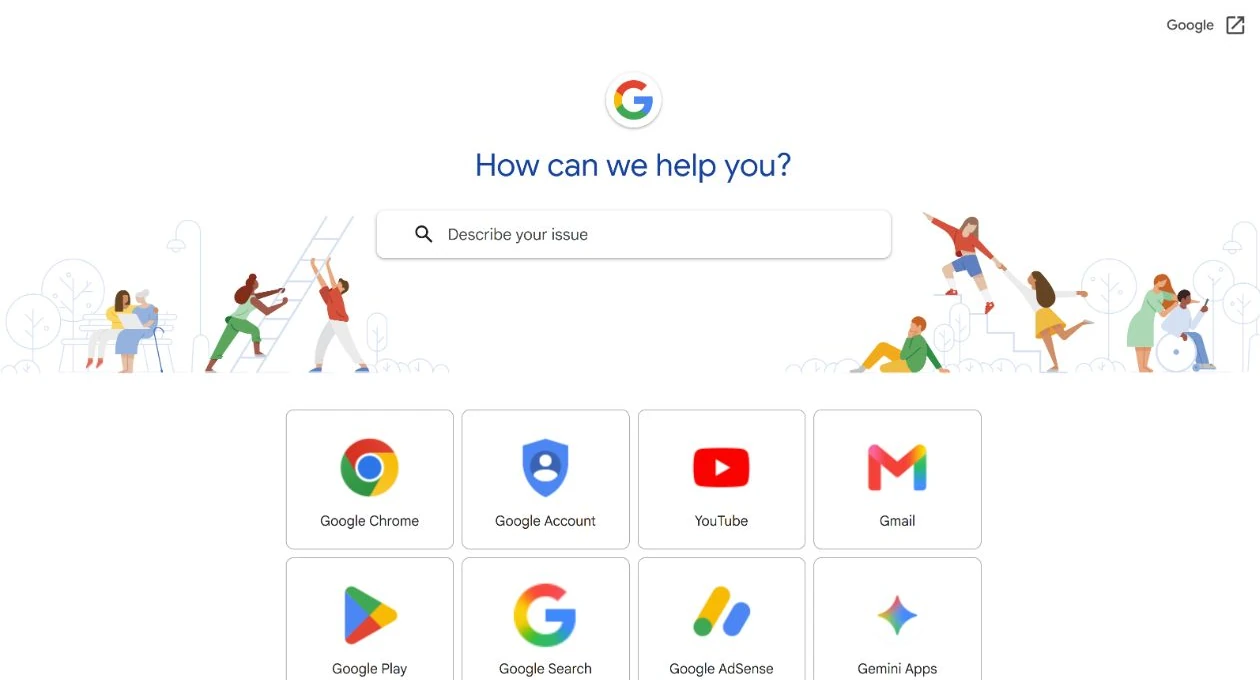
That visible organization is the useful exhibit. It lets a person begin without studying everything the organization knows. It does not mean the information behind the interface is small.
Google Search itself also has systems behind its interface. Google describes crawling, indexing, and serving results as separate stages. A straightforward starting point can rely on substantial work underneath.
Google is the example here, not the template. Google Search has an unusual advantage: people familiar with it arrive already knowing what the search box does. A service-business website has a different job. A roofer, attorney, or security integrator may need more visible explanation and proof. Depending on the customer and industry, the site may need to explain services, establish trust, answer questions, address objections, clarify pricing or process, and help someone decide what to do next.
The lesson is not to make your website as visually sparse as Google’s homepage. It is to make each customer’s experience as clear and low-effort as possible while providing the useful information that customer actually needs. Simple experience. Deep infrastructure.
Simple means less effort for the visitor
A useful definition of simple is reducing unnecessary cognitive effort: people can recognize where they are, find what matters, and understand their next step. Clear language, hierarchy, navigation, and focused answers can make a detailed page easier to use; fewer words alone cannot.
A short site can still be difficult. Imagine a single service paragraph that leaves visitors guessing whether you handle their problem, serve their area, or work with their type of business. A longer site can feel straightforward when each destination answers a clear question and its links make sense.
For your business, that infrastructure might be a clear service explanation, relevant proof, useful answers, reliable contact handling, and someone responsible for keeping it accurate. You do not need every possible component. You need enough to support the decisions your actual customers face.
If you are launching a focused business with one straightforward offer, a modest site may serve it well. If customers must compare materially different services or evaluate complex work, forcing all of those decisions into one vague page can make their job harder. Customer familiarity, purchase risk, price, buying stage, and proof requirements help determine how much explanation belongs in view. Customer need determines architecture. Neither size is a quality certificate.
Every ranked landing page can be a front door
That same low-effort experience matters wherever someone arrives. Your homepage is one possible entrance. Someone finding a relevant service page, industry or location page, article, FAQ, comparison, or case study through search may begin there instead. Your homepage does not have to contain every answer if those destinations are easy to find and use.
That page needs to orient the visitor: what this answer covers, who provides it, what evidence supports it, and where to go next. It should not require a detour through the homepage to make sense. Our guide to whether users land on a service page or the homepage explains that distinction in more detail. A separate URL does not guarantee indexing, ranking, or traffic.
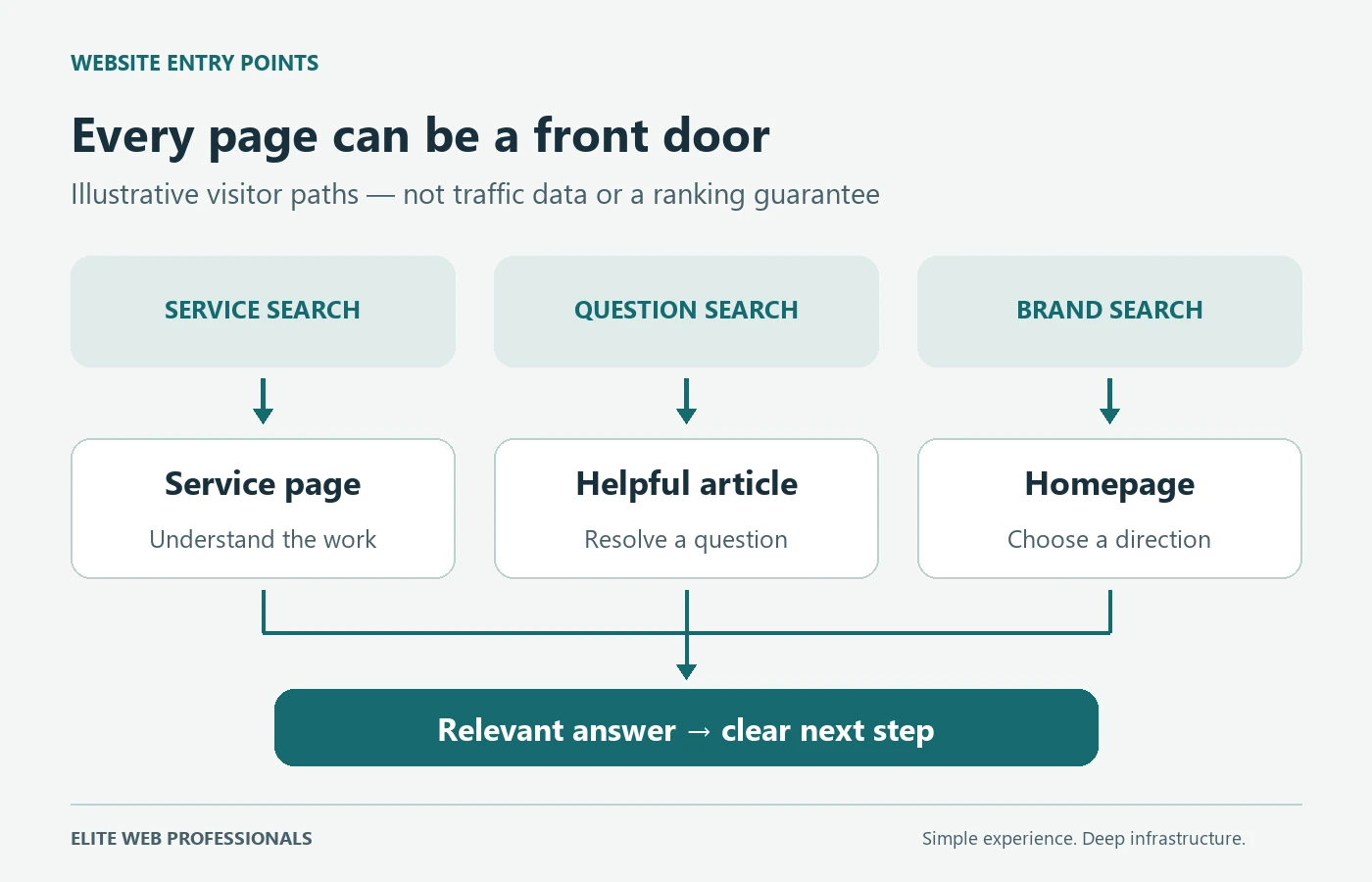
Think of a city map: making the map easier to read does not require removing useful destinations from the city. It requires clear labels and routes. The same distinction helps when simplifying a website: improve how people reach the right information before deciding that the destination should disappear.
A first-party example: AdvertisingBusiness.org’s Search Console report recorded 181 web-search clicks to our Google Workspace sign-in guide from June 19 through September 18, 2026. The destination was an article, not the homepage. This shows that a useful answer can be an entrance from search. It does not tell us how many visitors became leads, prove that all clicks were qualified, or measure the effect of simplifying a website. Source: our verified Search Console Pages report, checked September 20, 2026.
A page has to earn its existence
Multiple entrances are useful only when they lead somewhere worth visiting. Useful depth is valuable. Unmanaged depth is debt. Adding a page because a keyword tool produced another phrase does not establish a customer need.
Google’s spam policies specifically address doorway abuse and scaled content abuse. Doorways can include substantially similar pages created for similar searches that funnel people toward a less useful intermediate destination. Scaled abuse concerns producing many pages primarily to manipulate rankings rather than help people, regardless of how the content was produced. Violations can reduce visibility or remove pages from results.
Before creating a separate URL, use the Page Earns Its Existence Test:
- Distinct intent or task: What is the visitor trying to accomplish here that another existing page does not already serve?
- Distinct answer or value: What useful information, comparison, process, or action belongs here?
- Distinct proof or context: What real experience, service detail, evidence, or customer circumstance makes this destination meaningfully different?
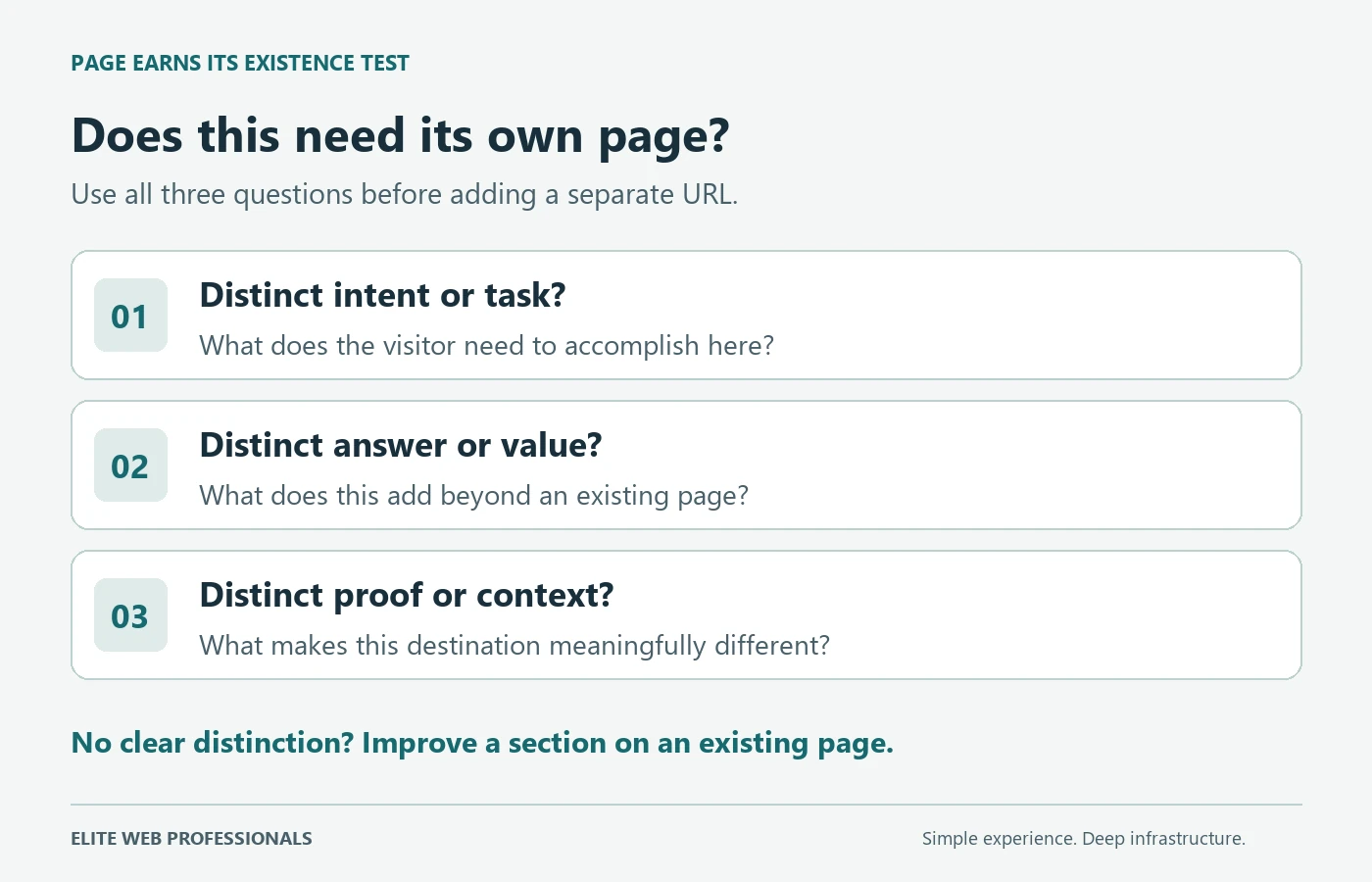
A different heading or place name is not enough. A genuinely different service problem with its own explanation and evidence may justify a page. A closely related question that helps complete an existing answer may work better as a section on that page.
If you need a detailed inventory of possible destinations, use what pages to add to a service-business website as a planning aid. Evaluate each suggestion against the test; it is not a quota.
“Of course a web agency wants me to have more pages”
That is a fair objection. More pages can increase the writing, design, review, and ongoing maintenance an agency sells. A proposal should explain the customer need and value behind each addition, not use a larger page count as proof of a better website.
Ask the agency to show which existing page already addresses the question, what the new page adds, and how the business will maintain it. Ask what they would combine or keep as a section. A recommendation that never includes “you do not need another page” deserves scrutiny. At Elite Web Professionals, that same standard can justify consolidating overlapping pages, redirecting replaced URLs, pruning obsolete material, or making a deliberate noindex decision when a page should remain available but stay out of search. Each needs evidence—not a blanket page-count target.
Our existing article on missing useful website content addresses the other side of the decision. The standard here is whether customers have the answers they need—not whether a site has hit a page count or publishing frequency.
Set expectations around the actual build and strategy. A clear interface cannot make up for an unconvincing offer, weak evidence, stronger competition, or a lack of qualified visitors. A deeper site can support more decisions, but it also creates more work. Neither a small brochure nor a large content library comes with a lead guarantee.
Simplify the experience before removing the assets
That evidence standard applies to removals as well as additions. A redesign is a good time to question confusing navigation and repetitive content. But “too many pages” may really mean unclear labels, overlapping menu choices, weak hierarchy, or poor internal links. Simplify how people reach the information, then evaluate whether the underlying pages still have value. Do not throw away useful URLs just because they do not fit a cleaner-looking menu.
Use this preservation sequence before pruning:
- Inventory: list existing URLs, their purpose, and the information they contain.
- Measure: review available search queries, landing-page activity, links, and verified conversions. Record missing data instead of treating it as zero value.
- Classify: decide which pages to keep, improve, combine, or investigate. Customer usefulness matters alongside traffic.
- Consolidate: when pages substantially serve the same need, move the useful material into the strongest appropriate destination. See the full guide to consolidating old content.
- Redirect: if an approved change removes or replaces a URL, map it to a genuinely relevant successor where one exists. Do not send every old page to the homepage.
- Validate: check the resulting pages, redirects, internal links, canonicals, indexing signals, and customer paths; then monitor what changes.
Google’s guidance for site moves with URL changes supports URL mapping, redirects, updated links, and monitoring. It also warns that search visibility can fluctuate during a move. Keeping useful URLs while improving presentation can avoid an unnecessary migration, although it does not eliminate every redesign risk.
What simple navigation over useful depth can look like
Illustrative example—not a client case study: a heating and cooling company gives visitors a short main menu: Services, About, Resources, and Contact. A Services page helps people choose the relevant route. The repair page explains repair work and the next step; replacement guidance helps someone facing a different decision. Relevant evidence supports each claim.
A visitor looking for repair can get help without reading every resource. Someone weighing a replacement can explore the detail they need. Related questions stay with the answer they clarify unless they pass the separate-page test. There is no requirement to create a page for every symptom, keyword variation, or nearby city.
The visible experience stays focused because the organization does the sorting. Behind it, someone must own service details, review outdated advice, and make sure inquiries reach the right person. If the improved experience produces more inquiries, the new problem is capacity: qualification, routing, and timely follow-up need owners too.
AI answers make reliable source information worth maintaining
When a search result answers a question directly, some informational visits may no longer be necessary. Treat that as a planning possibility, not a measured decline for your business. Google says its AI search features use the same foundational SEO practices; there are no special additional optimization requirements or special schema needed for them. Helpful visible text, discoverable internal links, and accurate information still matter. None of this guarantees inclusion or citation.
Your response should be to make the business facts and decision support reliable enough to stand on their own. The same maintained answers can help customers evaluate a service, give sales teams a dependable reference, and inform an AI agent’s approved knowledge. Those are uses for accurate information, not promises of citations, traffic, or conversions. A thin page that withholds essential details does not become more useful because the search interface changes.
Copy the principle, not Google’s scale
You are building for your customers, your offer, and your ability to maintain the result. A plumber, consultant, dentist, or other local business does not need to recreate Google’s ecosystem. The transferable lesson is to organize complexity so that customers encounter the detail relevant to the decision they are making, without having to navigate everything else.
Replace “How small can we make it?” with “How much effort does a customer need to get the right answer?” Then replace “How many pages?” with “How many distinct customer needs must this site support?” Those questions leave room for both a lean site and a deeper one.
Your 10-minute website-depth self-check
- Minutes 1–2: name the decisions. Write the three customer questions that most often come before an inquiry. Do your service pages answer them clearly, or is essential explanation or proof missing?
- Minutes 3–4: try another entrance. Choose a top landing page from your available reports, or a service page if you lack that data, and open it directly on your phone. Can you tell who it helps and what to do next without visiting the homepage?
- Minutes 5–6: test one page’s purpose. For an existing or proposed page, write its distinct task, answer, and proof. Does another page already serve that need? Is this one trying to answer unrelated questions? Flag overlap or a confused purpose before adding anything.
- Minutes 7–8: protect what might matter. Choose one page you were considering removing. Check available evidence and its customer purpose. If search discovery matters, review its indexing status in Search Console when available. Missing evidence or a page not being indexed is a reason to investigate, not automatic permission to delete.
- Minutes 9–10: assign the next action. Make three short lists: preserve, clarify, and consider combining. Name who will check the evidence and who will maintain the answers.
Need help making those decisions? Contact Elite Web Professionals with your website URL and your preserve, clarify, and combine list. Start with the customer needs and existing assets before deciding what a redesign should add or remove.
Related reading: Website redesign triggers: when is it time for an upgrade?
What Google Can Teach Business Owners About Websites
Article 1: “Make It Simple, Like Google”: The Website Advice That Quietly Costs Businesses Leads
Next: How Many Pages Should Your Website Have? Ask Google — coming next in this series.
Sources
Official sources checked September 20, 2026. Google’s published guidance, the observed Help interface, and our business interpretation are distinguished above.
- Google Help — observed support entry point and current screenshot.
- How Google Search works — crawling, indexing, results, and lack of indexing guarantees.
- Google Search spam policies — doorway and scaled content abuse.
- Site moves with URL changes — preservation and migration guidance.
- AI features and your website — established SEO practices and no special AI schema.

 customersupport@advertisingbusiness.org
 (770) 874-6085