 (770) 874-6085


 770-874-6085
WordPress 7.1 adds useful responsive-design, media, collaboration, and block-building controls, but its bigger story is why marketers still choose WordPress while competing platforms continue to gain ground. The new release, code-named “Mary Lou,” is not a ranking button. It is a practical Core update for teams that publish, edit, measure and maintain a website over time.
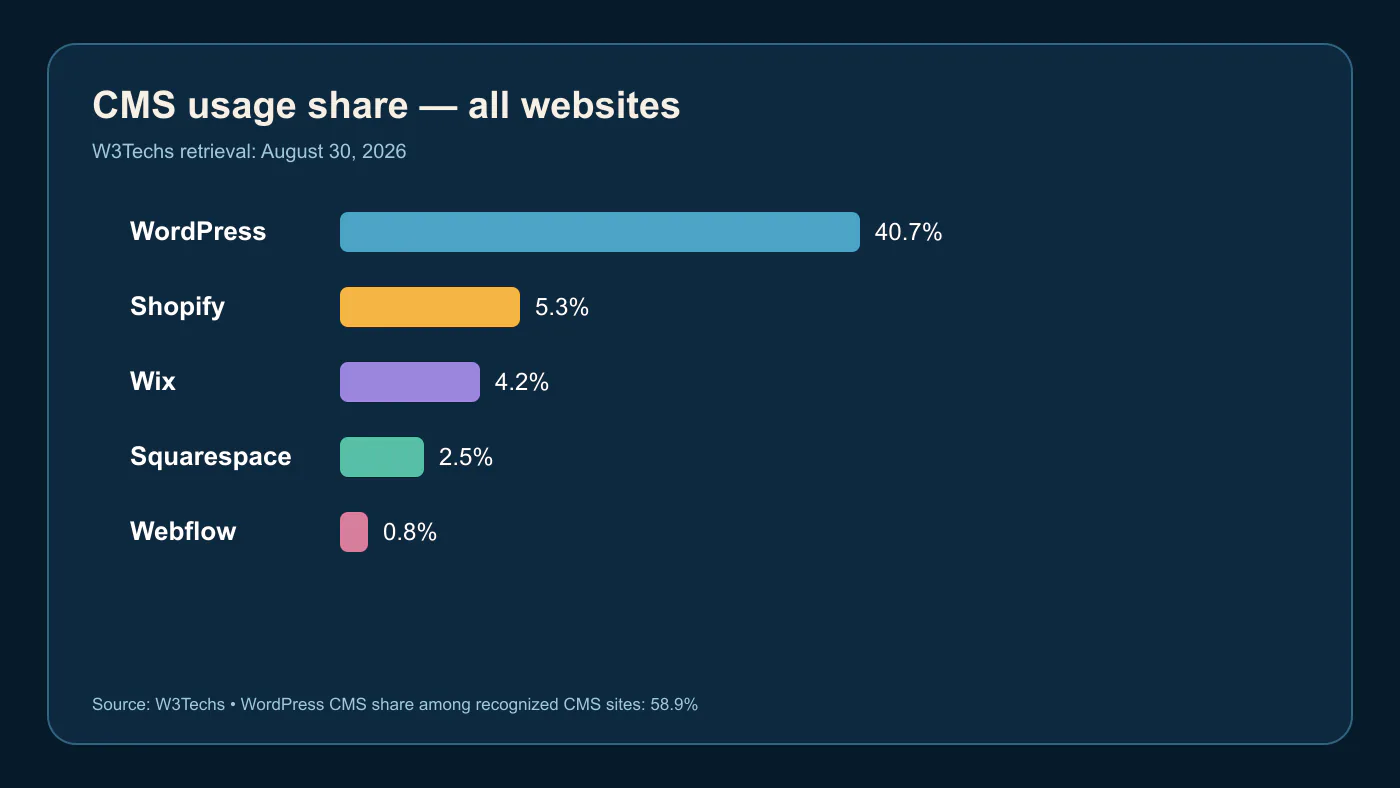
Direct answer: WordPress 7.1 adds built-in responsive styling, a consolidated media editor, richer inline Notes, Playlist and Tabs blocks, plus workflow, performance and accessibility improvements. W3Techs reported WordPress on 40.7% of all websites and 58.9% of sites using a recognized CMS on August 30, 2026. That scale reflects ecosystem and control—not an automatic Google advantage.
| Key fact | Verified detail | Decision implication |
|---|---|---|
| Release | WordPress 7.1 “Mary Lou,” August 19, 2026 | Test compatibility before production. |
| Design | Responsive styling in the Site Editor | Check active theme support and mobile output. |
| Media | New editor, browser-side processing | Review upload and crop workflows. |
| Usage | 40.7% of all websites, W3Techs | Large ecosystem; methodology matters. |
| SEO | No CMS ranking guarantee | Execute fundamentals on the chosen platform. |
What Changed in WordPress 7.1
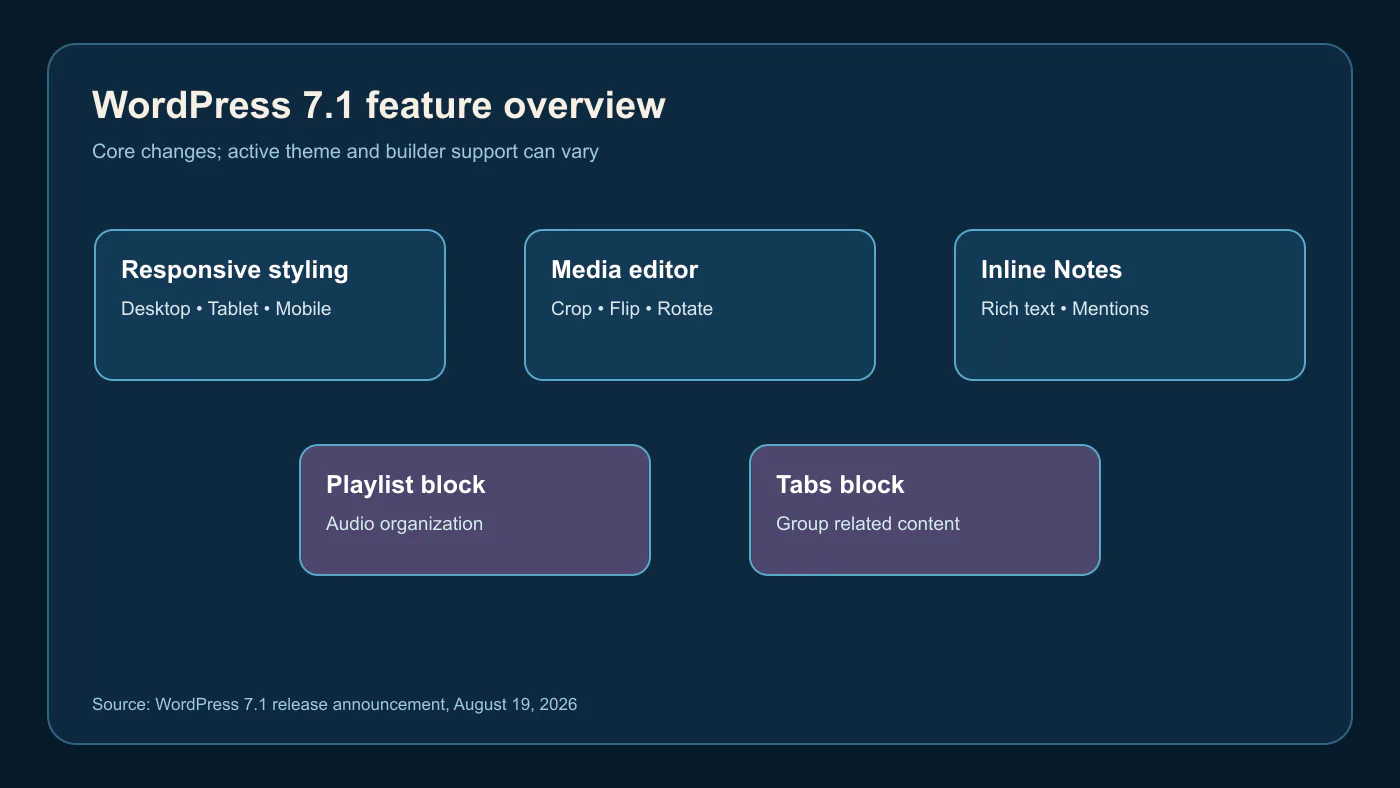
The official WordPress 7.1 release announcement highlights built-in responsive styling in the Site Editor, a dedicated media editor with crop, flip, rotation and metadata controls, richer Notes with mentions, and new Playlist and Tabs blocks. It also describes an admin bar across editors, browser-side image processing, native AVIF, HEIC and HDR gain-map support, and developer changes. Core features are not a promise that every plugin or page builder exposes them the same way.
WordPress Is Still the Most-Used CMS by a Wide Margin
W3Techs’ daily-updated overview reported, on August 30, 2026, WordPress on 40.7% of all websites and 58.9% of websites using a recognized content-management system. It listed Shopify at 5.3% of all websites, Wix at 4.2%, Squarespace at 2.5% and Webflow at 0.8%. Those are usage estimates from W3Techs’ methodology, not a quality score or a forecast. Different datasets can define and sample the web differently.
Does WordPress Automatically Rank Better on Google? No.
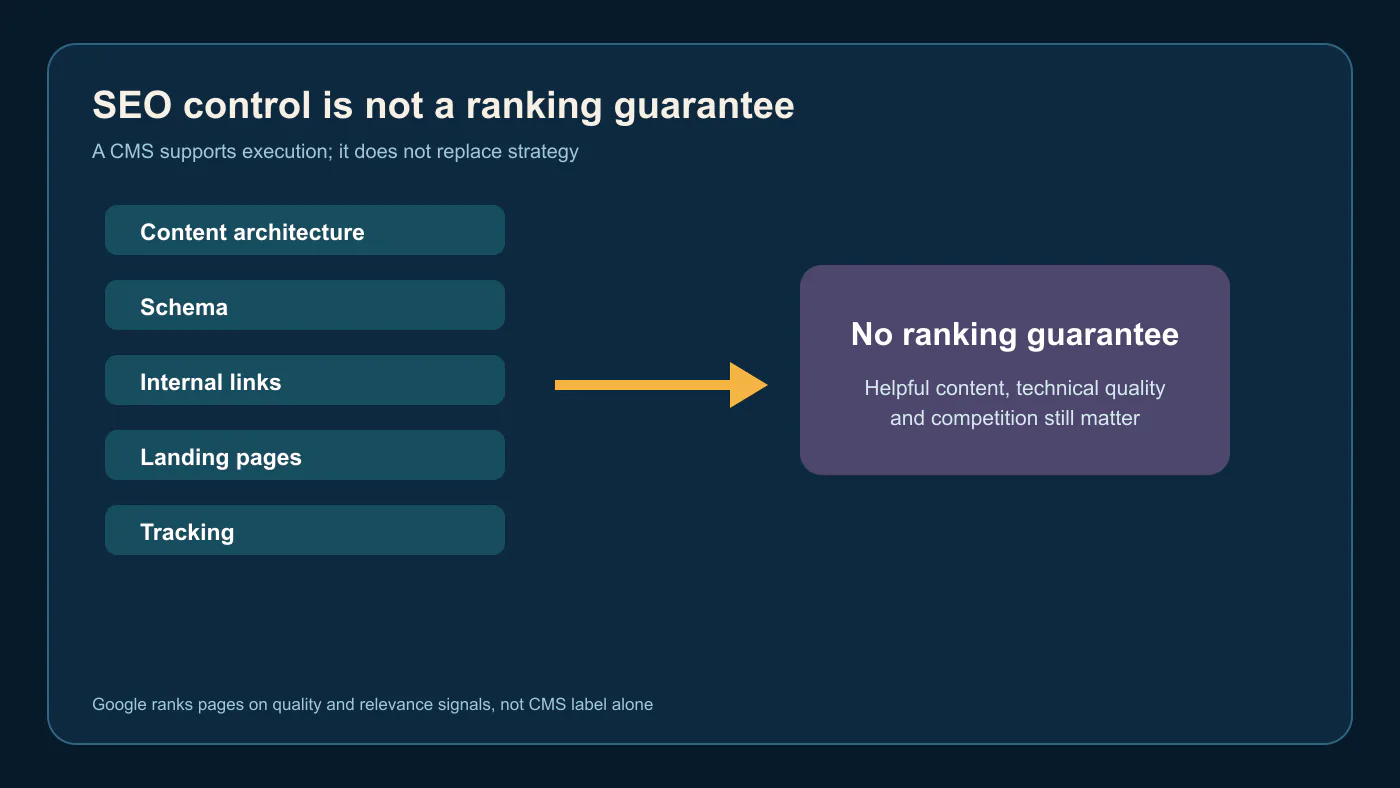
No CMS gets an automatic Google ranking bonus. Google’s Search documentation emphasizes helpful, accessible content and crawlable technical implementation, not a preferred platform label. WordPress can make URL management, internal linking, schema, publishing and integrations convenient; Shopify, Wix, Squarespace, Webflow and custom systems can also implement useful, indexable pages. Rankings still depend on relevance, quality, experience, technical health and competition.
Why Traffic-Focused Marketers Still Choose WordPress
Traffic-focused teams value WordPress because it can support a large content library, location and service architecture, forms, tracking, lead routing and a broad plugin ecosystem in one owned system. A local service business may need connected service pages, reviews, case studies, FAQs, call tracking and schema. WordPress gives a team room to evolve that operating system, but it also gives the team responsibility for updates, governance and performance.
The Control That Matters: Content, URLs, Schema, Data and Conversion
Control matters when it helps a business answer customer questions and capture demand. That means deliberate URL structures, clear templates, internal links, structured data that matches visible content, accessible forms, analytics events and usable landing pages. The site’s WordPress SEO guide covers those fundamentals: indexing, mobile experience, content architecture and measurement are operating disciplines, not a plugin setting.
Where WordPress Creates Extra Work
WordPress creates extra work when a site has unmanaged plugins, unclear ownership, duplicate builders, heavy themes, stale backups or ad-hoc publishing permissions. It requires a maintenance plan: updates, testing, security, caching, image discipline and rollback access. Teams that lack that capacity may get better outcomes from a managed platform. The right answer is not “WordPress always”; it is “choose the operational burden you can responsibly support.”
Shopify, Wix, Squarespace and Webflow Are Competing in Different Ways
Shopify is often the natural fit for commerce-first operations that want managed storefront infrastructure. Wix can suit smaller businesses seeking an all-in-one, lower-maintenance system. Squarespace can suit design-led small sites and portfolios. Webflow is attractive for design-forward marketing teams that value visual development and component control. Framer can support fast campaign launches; headless or custom systems fit specialized applications. Each can be strong when the business model matches its tradeoffs.
Which Platform Fits Which Business Model?
Choose WordPress for content-rich, SEO-led, lead-generation or mixed models that need extensibility and ownership. Choose Shopify where commerce workflows dominate; compare Shopify with WooCommerce or a hybrid when deep content and unusual integrations matter. Choose Wix, Squarespace, Webflow or Framer when a smaller, design-led footprint and managed simplicity fit the roadmap. Choose headless or custom when application complexity justifies its build and maintenance cost. Platform fit is a business decision, not a popularity contest.
What to Check Before Updating to WordPress 7.1
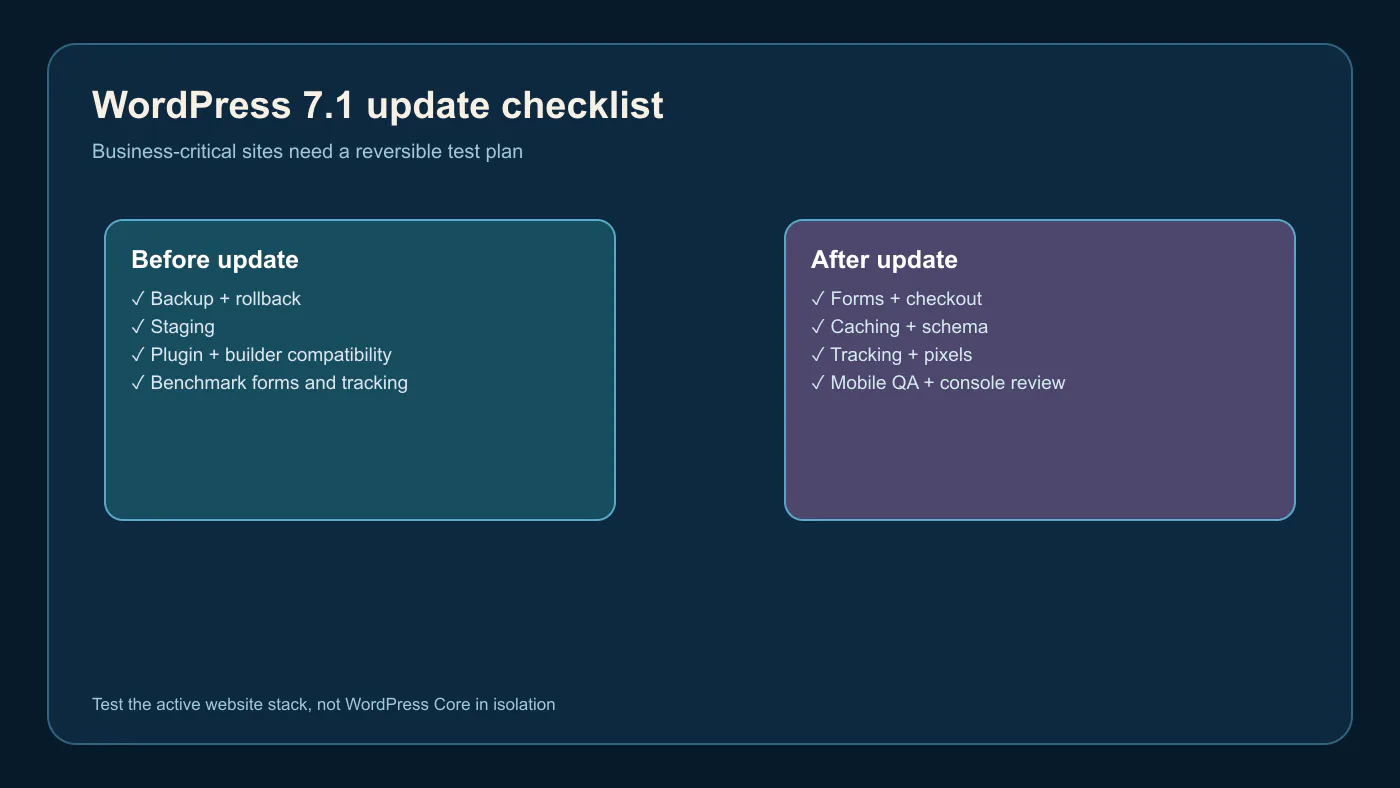
Before updating, create and verify a restorable backup; record WordPress, PHP, theme, builder and plugin versions; test in staging; confirm compatibility; capture desktop and mobile benchmarks; and document forms, checkout, events, schema and cache settings. A business-critical site also needs a rollback owner. Core release notes identify change, but they cannot certify a particular stack of plugins, hosting controls and custom code.
What to Test Immediately After the Update
After updating, test the homepage, templates, service pages, posts, navigation, page builder, important forms, booking or checkout, calls and payments. Verify analytics, advertising pixels, CallRail and conversion events; inspect rendered metadata and schema; clear cache layers; review mobile layout, responsive crops and console errors. The formal WordPress 7.1 documentation is the correct source for installation and release-specific details.
Choose the Platform That Supports the Growth System
WordPress 7.1 does not guarantee traffic or rankings, but it reinforces why marketers value a platform that gives them broad control over content, conversion paths, integrations, data, and long-term growth.
Choose a Website Platform That Can Grow With the Business
Elite Web Professionals builds website systems around traffic, conversion, content, tracking and long-term ownership—not a platform label alone. A platform and website-strategy review can identify the right level of flexibility, maintenance and marketing control for the business. Explore the team’s website-design services to connect platform choice with a Growth Engine that helps a business be visible, be found and get chosen.
Frequently Asked Questions
What are the most important changes in WordPress 7.1?
WordPress 7.1 adds responsive styling controls, a dedicated media editor, richer inline Notes with mentions, and Playlist and Tabs blocks, among other workflow, performance and accessibility changes. The exact effect depends on the active theme, builder, plugins and hosting environment.
Is WordPress still the most-used content-management system?
Yes, by W3Techs’ August 30, 2026 measurement, WordPress was used by 40.7% of all websites and held 58.9% share among sites using a recognized CMS. Those are W3Techs estimates; market-share methodologies and samples differ across providers.
Does WordPress rank better than Wix, Shopify or Webflow?
No. WordPress does not receive an automatic Google ranking advantage over Wix, Shopify or Webflow. It can offer useful control over architecture and integrations, but search performance still requires helpful content, crawlability, sound technical implementation, good user experience and competitive proof.
Why do SEO agencies continue to use WordPress?
SEO agencies often use WordPress because it can support flexible content architecture, URLs, internal links, schema, landing pages, forms, analytics and integrations. Those capabilities make execution easier for many growth plans; they do not remove the need for maintenance, editorial quality or technical governance.
Should a business update to WordPress 7.1 immediately?
A business should update after testing compatibility and rollback readiness, especially on business-critical sites. Create a verified backup, use staging when possible, check page-builder and plugin support, and test forms, tracking, schema, mobile behavior and cache after the update.
Which businesses may be better served by Shopify, Wix, Squarespace or Webflow?
Shopify can fit commerce-first businesses, while Wix or Squarespace can fit smaller teams that want managed simplicity. Webflow can fit design-forward marketing sites. The best option depends on commerce, content, integration, staffing, ownership and maintenance needs—not a universal CMS ranking.
KPIs to Track
- Organic impressions and CTR for WordPress 7.1 terms
- Engagement with platform decision content
- Clicks to website-design and SEO services
- Website-strategy inquiries and assisted conversions
- Core Web Vitals and post-update conversion health
Watchlist
- 7.1 maintenance releases and compatibility notices
- Theme, builder and essential-plugin support
- CMS-share changes with dated W3Techs retrieval
- Post-update performance, forms and tracking regressions
Sources
- WordPress: WordPress 7.1 “Mary Lou”, August 19, 2026.
- WordPress 7.1 documentation.
- W3Techs CMS usage overview, retrieved August 30, 2026.
- Google Search documentation.

 customersupport@advertisingbusiness.org
 (770) 874-6085