 (770) 874-6085


 770-874-6085
AI agents for website management are moving beyond code suggestions into workflows that can audit, edit, validate, and publish changes across a working website. That does not mean a business should hand an autonomous tool the keys to production. It means website operations can move faster when an agent has a defined job, reliable context, narrow permissions and a person who remains responsible for the outcome.
Quick Answer
Webflow says its new Codex and ChatGPT connection can support audits, CMS work, validation, safe publishing and developer workflows. Figma adds design-system context that screenshots miss, while Codex provides an execution environment for scoped work. The business opportunity is faster implementation; the operating requirement is still staging, approval, logging and rollback before a live customer journey changes.
Key Facts
| Fact | What is confirmed | Business implication |
|---|---|---|
| Date | Webflow launched its Codex availability on August 24, 2026. | Connected agent workflows are now a current operations option. |
| Audit scope | Webflow lists SEO, AEO, accessibility, broken links and performance. | Start with observable, reviewable findings. |
| CMS | Webflow lists creation, updating and organization of CMS content. | Use approved content rules and component constraints. |
| Publishing | Webflow describes validation before safe publishing. | Keep a human production gate and rollback plan. |
| Design context | Figma MCP can provide components, tokens, layouts and code context. | Reduce design drift before implementation. |
What Webflow Added to Codex and ChatGPT
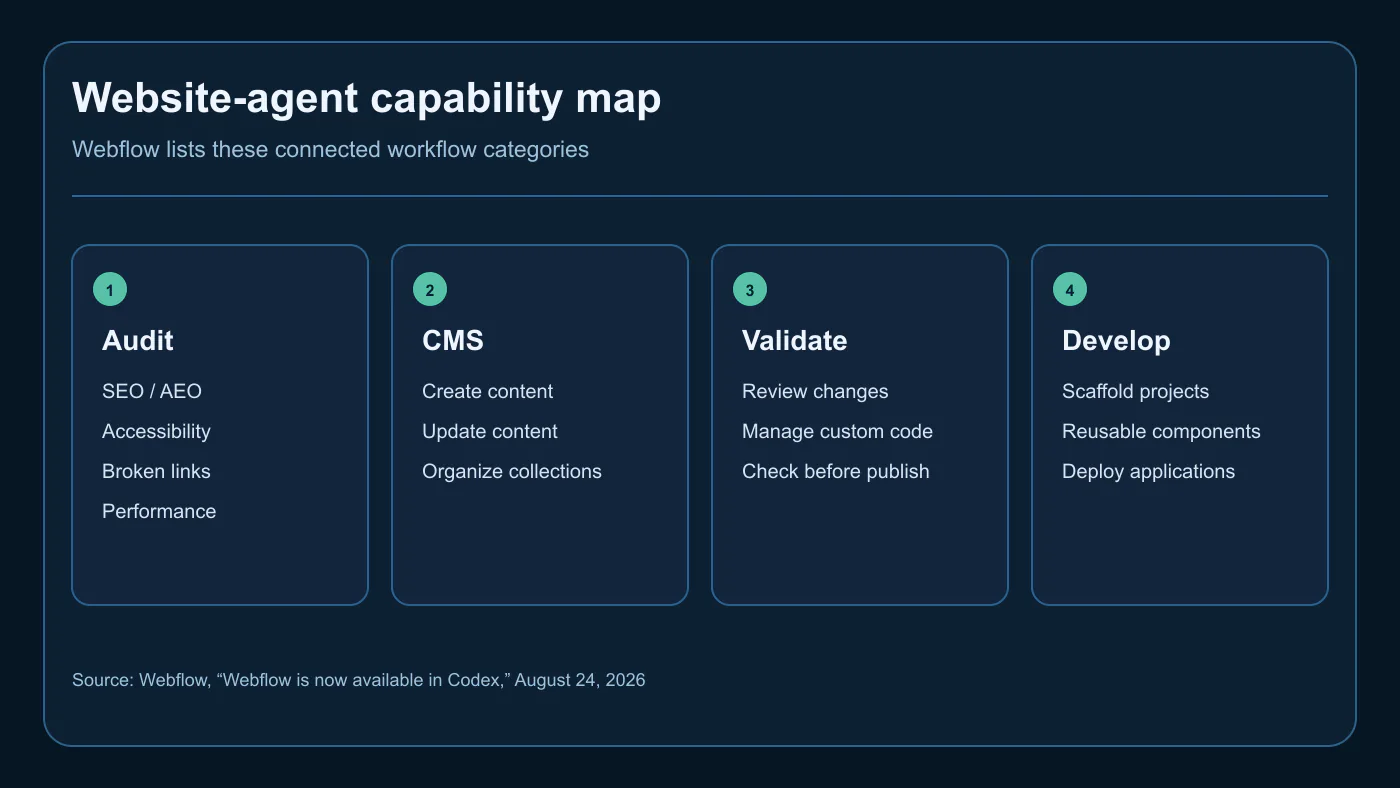
Webflow added a connected operational surface, not merely a prompt box. In its August 24, 2026 official update, Webflow says MCP-powered capabilities are available in Codex and ChatGPT after a workspace connection and access grant to selected sites. It lists site audits, CMS management, safe publishing and developer workflows as built-in skills.
That list crosses the boundary between recommendations and action: an audit can inspect SEO, accessibility, broken links and performance; CMS work can create or organize content; a developer task can scaffold components or manage custom code. The terms are workflow categories, not a promise that every account or request behaves the same way.
What Figma Adds That Screenshots Cannot
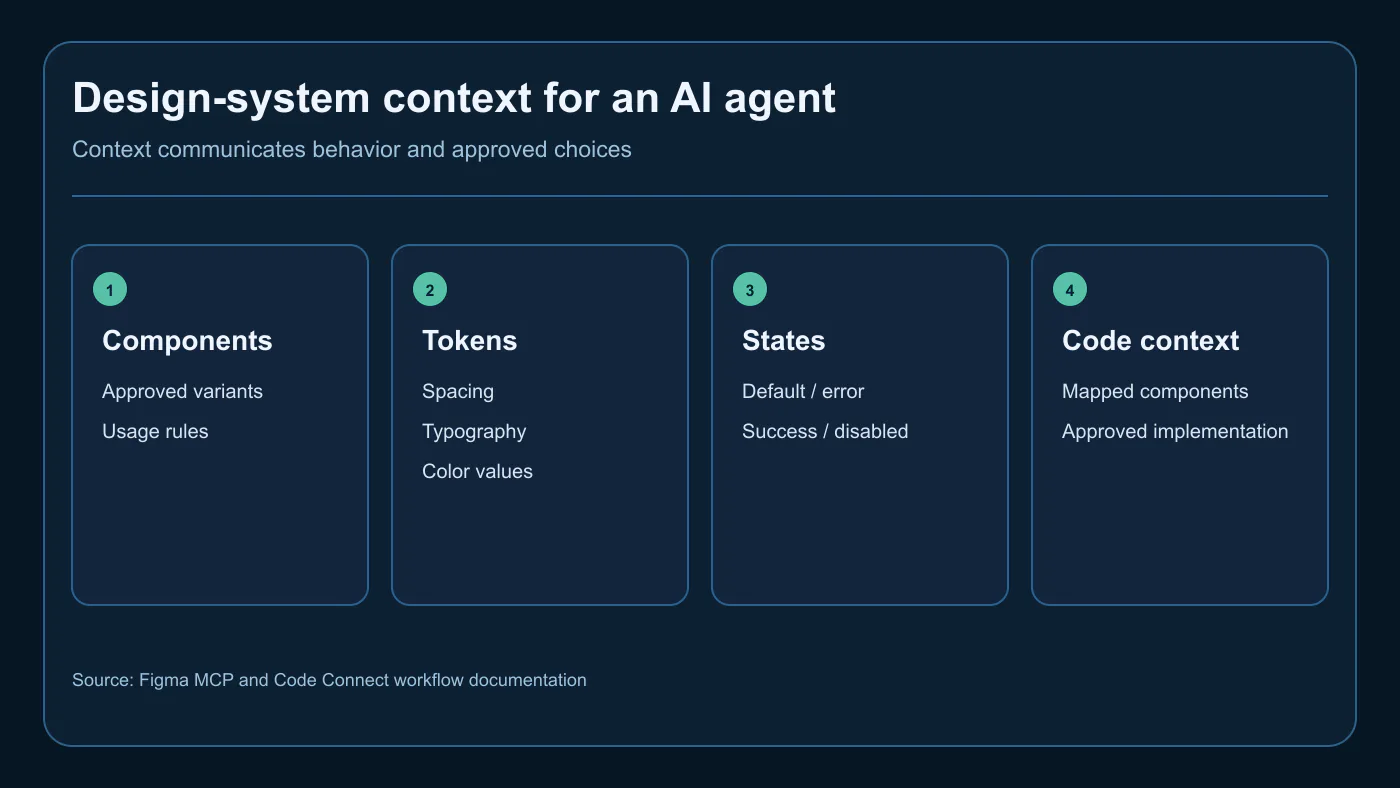
Figma adds the rules behind an interface, not just its appearance. A design system is the organized set of reusable components, tokens, variants, states and usage decisions that keep a site or product coherent. In Figma’s August 26 Workflow Lab, its MCP workflow gives a coding agent access to components, variables, layouts and a design-system library; Code Connect can map design components to the code that implements them.
A screenshot may show a button, but not its approved variant, token, error state, responsive behavior or code import. That missing context is where an agent can invent a near-match and create drift. Provide an approved library and accessibility expectations, then have a designer or engineer review the result.
Why This Is Bigger Than Another AI Website Builder
This shift is bigger because agents can diagnose, prepare, implement, test and, when authorized, publish. The useful unit is a bounded change with an owner, evidence and a safe exit path—not “make a website.” Treat a connected agent as a technical operator with limited authority, not an unrestricted administrator.
Three Controlled Website Use Cases
Turn an SEO audit into tested fixes
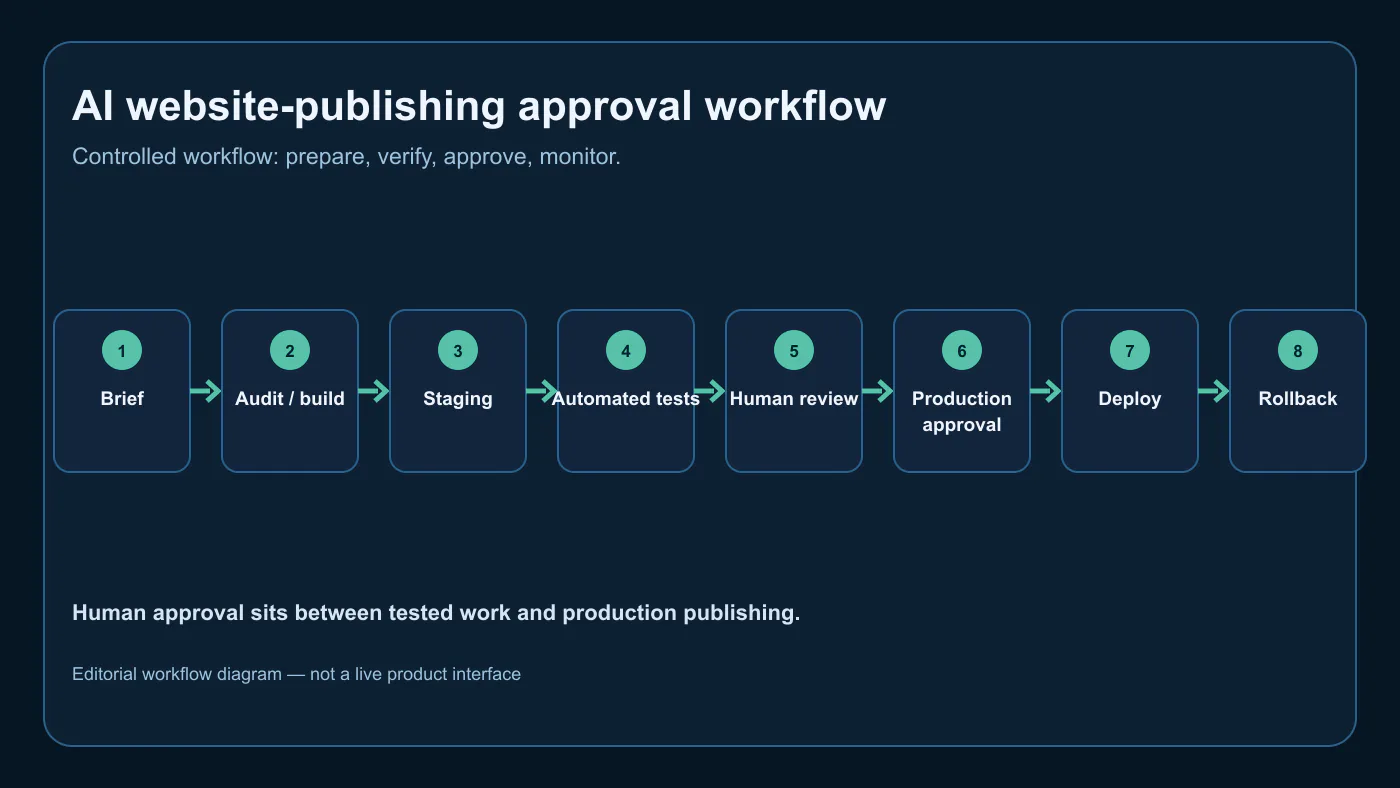
Ask the agent to identify broken links, missing descriptions, duplicate headings, accessibility issues or schema conflicts and create a prioritized staging change set. The human owner approves the list, checks the preview and then monitors Search Console, form completions and key landing pages after deployment. The related OpenAI Codex for SEO and web design guide is useful background on moving technical recommendations into implementation.
Update CMS content without breaking the system
Give an agent only the collection and fields needed for a service-page update, case study or campaign entry. Supply approved components, heading rules, internal-link limits, claim review and a named reviewer. The goal is not bulk publishing. The goal is a preview that follows the same customer journey and visual system as the rest of the site.
Build and test a conversion page from brief to publish
A defined brief can become a landing-page draft, form connection, tracking plan and mobile test checklist. Production publishing should stop until the owner has checked the offer, legal claims, form routing, analytics event and privacy obligations. An agent can prepare the evidence; it should not decide whether a campaign is ready to represent the business.
Facts Versus Uncertainty
Confirmed: Webflow describes connected Codex and ChatGPT workflows for the listed capability categories. Figma documents an MCP workflow that carries design-system and code context into agent work. Not confirmed: a universal quality improvement, universal availability, or safe autonomous production changes. Businesses must verify their own permissions, plan, site architecture, data exposure, integration behavior and rollback options before delegating a task.
What an AI Agent Should Never Change Without Approval
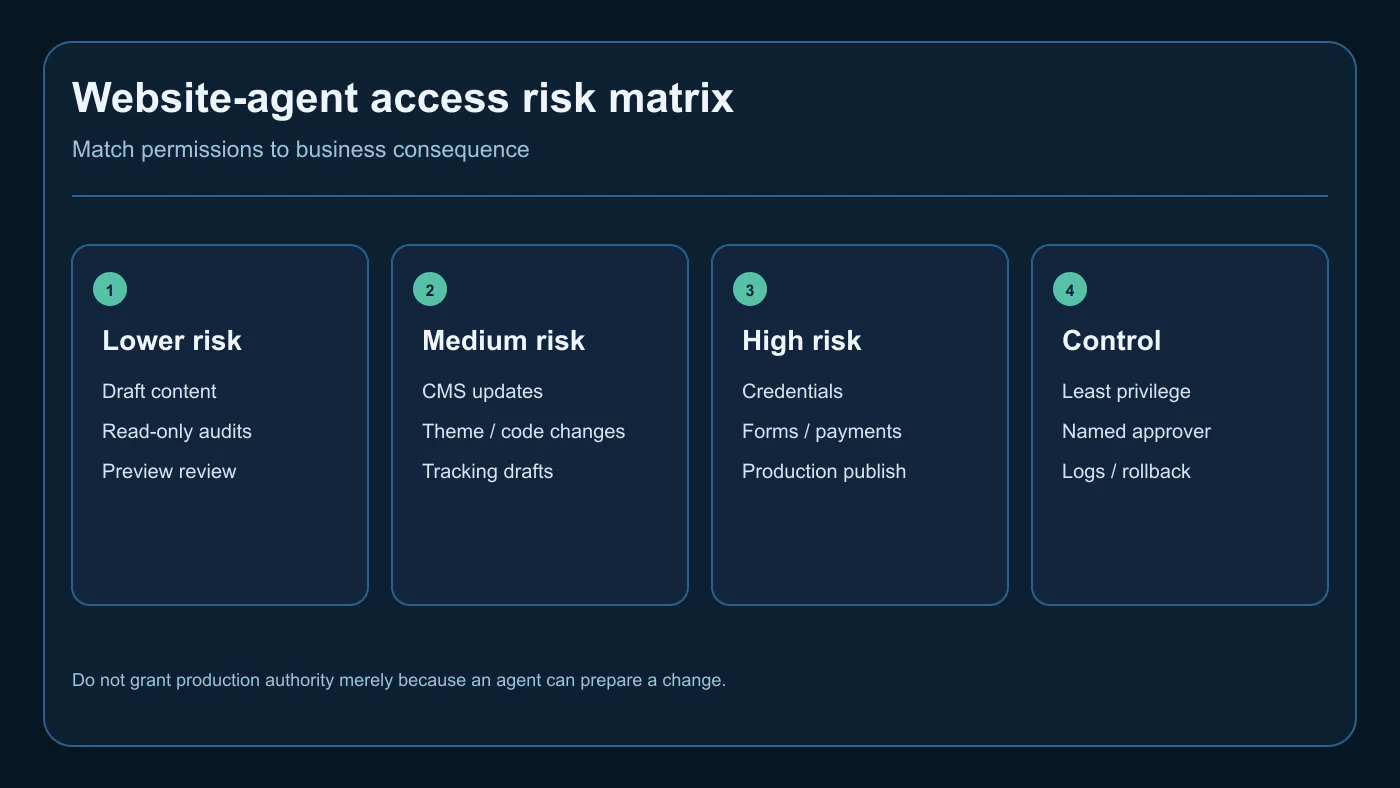
Keep credentials, user permissions, DNS, hosting, payment settings, form destinations, tracking, production publishing, legal claims, pricing, deletion and security controls behind an accountable human approval. The same principle applies to search-critical changes such as robots directives, canonicals, redirects and large-scale internal links. For access design, use the live guide to provide website administrator access safely rather than sharing a generic owner login.
The Five Controls Every Agent-Operated Website Needs
- Least privilege: a dedicated account with only the needed site, collection or environment.
- Approved context: components, tokens, content rules, and an explicit definition of done.
- Protected change path: staging or a preview before production.
- Evidence and recovery: diffs, logs, tested backups and a documented rollback owner.
- Human production approval: especially for forms, tracking, payments, credentials, claims and deletions.
How WordPress, Webflow, and Custom Sites Fit This Shift
The controls travel better than the platform. Webflow may expose connected workflows; WordPress may require scoped editor, staging or repository access; a custom site may use a pull request and deployment preview. Separate an agent’s ability to prepare work from its authority to make a customer-facing change. The AI web-design overview explains why design systems and QA remain important.
What to Measure After the Agent Starts Working
Measure more than tasks completed. Track approved-preview time, change rejection rate, pre-release defects, rollback frequency, form and tracking health, and conversion impact. Also measure component drift. Speed without a reliable customer path is not a website-management win.
AI agents for website management will create the most value when businesses combine fast execution with design systems, restricted access, staging, rollback plans, analytics, and accountable human review.
Give the Agent Guardrails Before You Give It the Website
Elite Web Professionals helps businesses build Growth Engine Websites that are designed to be visible, found and chosen while preserving the controls that protect forms, content, tracking and customer trust. A website-agent workflow should begin with a permissions map and a testable change path, not a shared administrator password.
Use a website workflow review to identify which jobs can be automated safely, which need a protected preview and which must remain human-approved.
Frequently Asked Questions
Can AI agents now publish website changes?
Yes, some connected website tools can let an agent prepare, validate, and publish changes, but availability and permissions depend on the account and integration. Webflow says its Codex and ChatGPT skills include safe publishing after validation. That capability is not a reason to remove production approval; a business should still use least privilege, a preview or staging step, an accountable approver, and a rollback plan.
What can Webflow do inside Codex and ChatGPT?
Webflow says its built-in skills in Codex and ChatGPT can support site audits, CMS management, safe publishing, custom-code management, and developer workflows. Its announcement names SEO, AEO, accessibility, broken links and performance among audit areas. A connected workspace and authorized site access are required, and the exact actions available can change as the integration evolves.
Why does an AI coding agent need a Figma design system?
An AI coding agent needs design-system context because a screenshot alone may not reveal the approved component, token, state, behavior, or code mapping. Figma describes MCP and Code Connect as ways to pass components, variables and implementation context into coding workflows. That context can reduce reinvention, but teams still need designers and engineers to review behavior, accessibility, and the resulting implementation.
Should an AI agent receive administrator access to a live website?
Usually no—not by default. Give an agent only the smallest permission set needed for the task, preferably in a non-production environment. Production administrator, credential, payment, form, tracking, DNS and user-permission changes should require an accountable human gate. Use a dedicated account, short-lived access where possible, logs, backups and a documented revocation path.
Can AI agents replace web designers or developers?
No. AI agents can accelerate defined, testable work, but they do not own the business decision, brand judgment, accessibility judgment, technical architecture, legal claims, or accountability for a live result. Webflow and Figma capabilities make a coordinated workflow faster; they do not remove the need for a designer, developer, content owner, or reviewer who can approve what reaches production.
What is the safest way to let an agent update a website?
The safest approach is a constrained workflow: define the change, grant least-privilege access, supply approved design and content rules, create a preview or staging change, run targeted tests, obtain human approval, deploy, monitor the customer path, and retain a rollback option. Keep a change log and revoke access when the work ends. Let the agent prepare more than it can publish.
KPIs to Track
- Impressions and CTR for AI website-agent queries
- Use-case engagement and workflow-review inquiries
- Approved-preview time and change rejection rate
- Post-release form, tracking and conversion health
- Assisted conversions and qualified website-design inquiries
What to Watch
- Webflow access, permissions and capability changes
- Figma MCP and Code Connect availability changes
- Integration data handling and account controls
- Design-system drift and exceptions after agent use
- Any rollback, tracking or form failures after release
The computer-use operating guide explains the difference between an attempted action and a verified outcome.
For permissions, client boundaries, and recovery controls, read the GPT-6 Astra safety guide.

 customersupport@advertisingbusiness.org
 (770) 874-6085